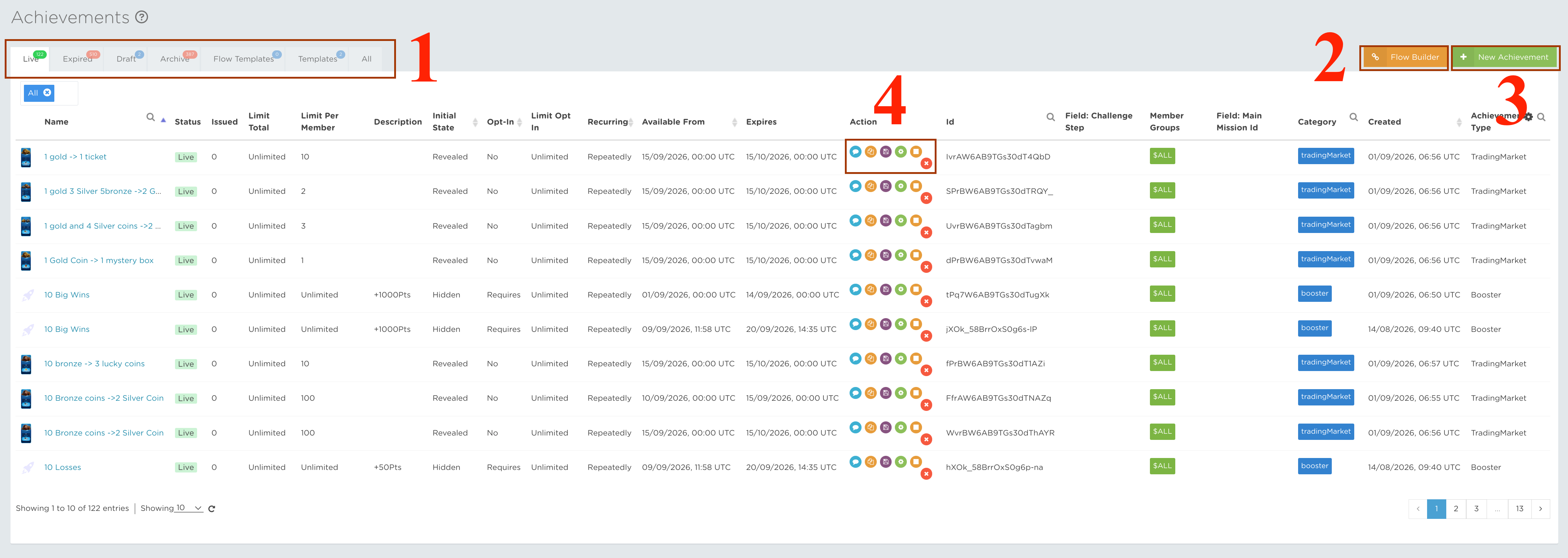
When you navigate to the Achievements Advance section shown in the screenshot below, you will find a list of all the Achievement Blueprints you have created. From here, you can filter them by state, change their state and create new Achievements.
TABS
The Achievements Advance page contains seven tabs that organise your Achievement Blueprints by their current state or purpose.

- Live – Filters all Achievements with the Live status. This includes Ready Achievements, which are configured as Live but have not reached their start date, and active Live Achievements, which can currently be issued to players.
- Expired – Filters Achievements that have passed their end date. They can no longer be issued, although players may still be able to preview them when visibility after expiry has been enabled.
- Draft – Shows Achievements that are still being configured, similar to draft emails. Drafts are only available to back office users. Change an Achievement to Live when it is ready to begin triggering; if its start date has already passed, it can begin immediately.
- Archive – Shows Achievements that have been archived. CompetitionLabs retains promotions for reference instead of permanently deleting them, so Archive represents the deleted state.
- Flow Templates – Contains preconfigured Flow Builder templates created by the CompetitionLabs team. For help understanding the available flows or creating templates for your space, contact customer support. You can also learn how to use them in the Flow Templates tutorial.
- Templates – Contains the reusable templates saved by back office users through Save as Template in the table’s Actions column. These templates follow the Achievements Advance creation wizard. See the Achievements creation tutorial for configuration guidance.
- All – Displays every created Achievement, ordered by creation date. Use this tab to quickly locate the most recently created Blueprint and take the required action.
FLOW BUILDER
The Flow Builder provides a visual workspace for connecting Achievement Blueprints through dependency relationships. It helps you see how individual Achievements relate to one another and organise them into a clear progression.
Use the builder when one Achievement should depend on the completion or outcome of another. This makes it easier to create connected member journeys while keeping the underlying Blueprint configuration manageable and reusable.
This tutorial section introduces the Flow Builder workspace and the process for creating, reviewing and managing Achievement dependencies. Read the Flow Builder tutorial for detailed guidance.
NEW ACHIEVEMENT
The Achievement creation steps, configuration options and explanations are covered in the Achievements creation tutorial.
ACTIONS
The Actions column lets you review and manage an Achievement Blueprint according to its current state.
 Preview
Preview an Achievement’s configuration and history, including its award rules, recipients and issue totals. The preview also provides the actions available for the Blueprint’s current state.
 Edit
EditEdit is available for Draft Achievements. It opens the Blueprint in the creation wizard so that you can update its configuration before it goes Live.
 Copy
CopyCopy or clone an Achievement in any state, including an archived Blueprint. The copied configuration retains the original fields and adds Copy to the name so that you can identify the new version.
 Delete / Archive
Archive removes the Achievement from active use while retaining it in CompetitionLabs for future reference.
 Save as Template
Save the Achievement as a reusable template for future promotions. The saved Blueprint will appear in the Templates tab.
 Stop
StopStop is available in the Live tab. It expires the Achievement so that it can no longer be issued to players. Once stopped, the Achievement cannot be returned to the Live state.
 Play
PlayPlay is available in the Draft tab. It changes the Achievement to Live so that it can begin issuing to players according to its schedule. Once started, the Achievement cannot be returned to Draft.
 Use
UseUse is available in the Flow Templates and Templates tabs. It opens the creation wizard with fields prepopulated from the selected template, ready for review and customisation.