Welcome to the CompetitionLabs Rules selection and creation section, which provides information on scoring tournaments based on simple points earned from a bet or win action, to constructing advanced scoring mechanisms involving multiple products or points boosters.
The following examples will help you to create a vast variety of tournament activity types and scoring mechanisms.
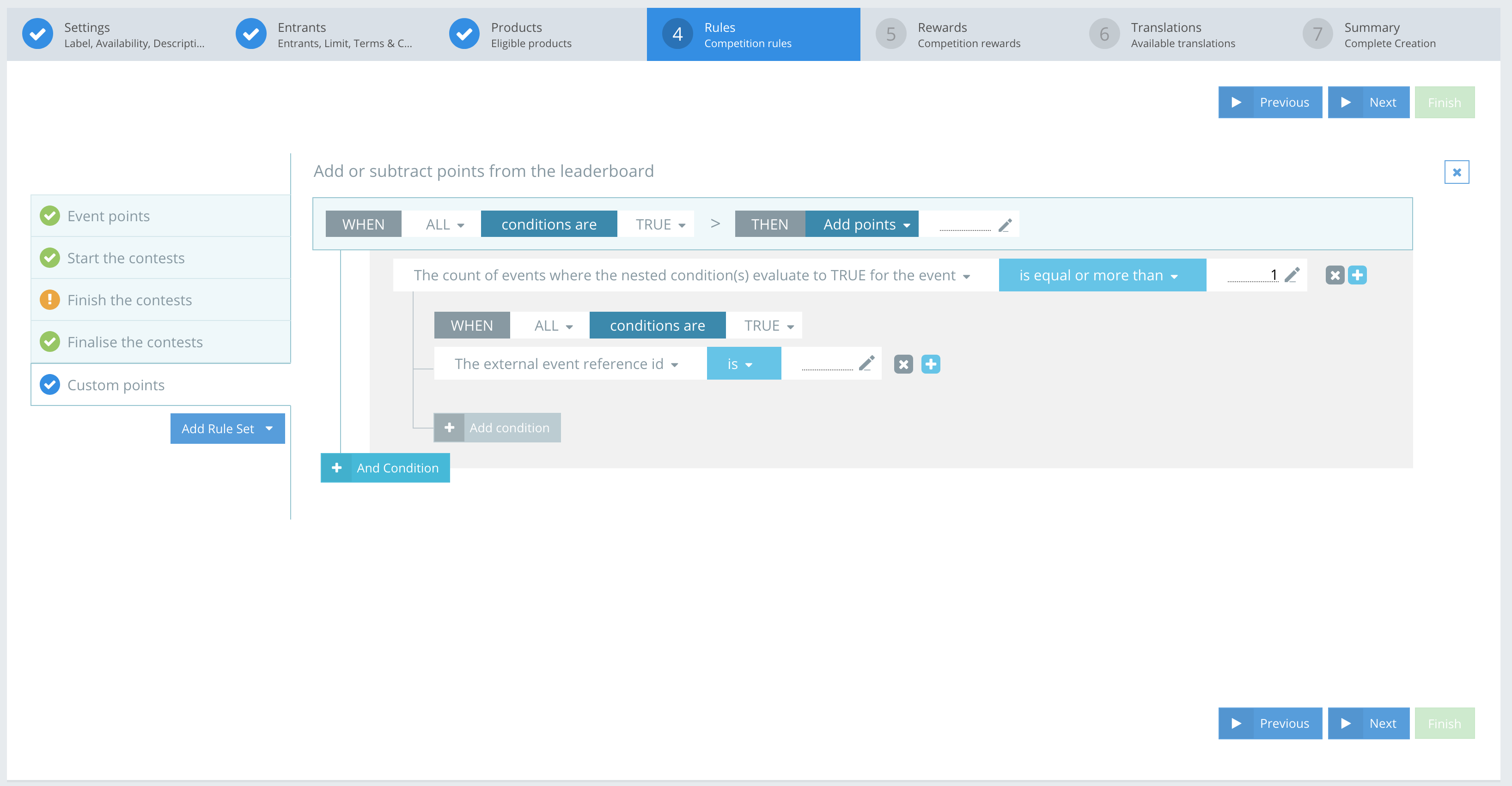
An example of the Rules system in CompetitionLabs is shown in the screenshot.
The icons you can use are:
 Remove – removes the rule and any sub-conditions.
 Add – lets you add an additional sub-rule or main rule in parallel to the one you are creating.
 Edit – lets you edit text or numerical values.
 Remove rule set – removes all the rules in the ruleset.
RULES LAYOUT
Creating a Competition with Contest Rules has a pre-determined basic layout. A Competition has to Start, Finish, Finalise, and Calculate points. You can preview a basic Rule set layout, and add additional Rule sets based on your needs.
RULE SET – Default layout
The basic default Rule sets are:
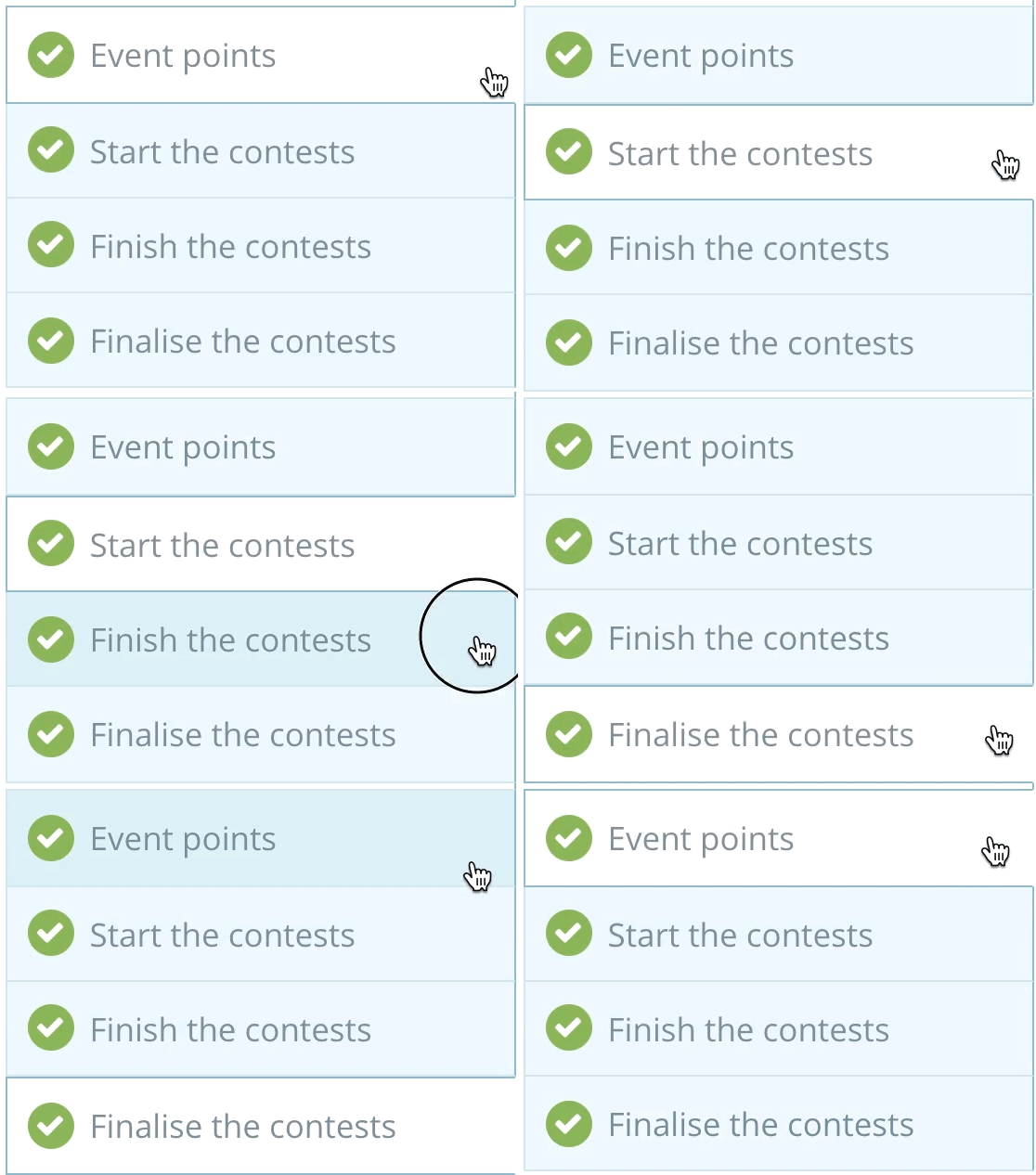
- Event Points – adds the event points to the leaderboard
- Start the contests – indicates when to Start the contests
- Finish the contests – indicates when to Finish the contests
- Finalise the contests – indicates when to Finalise the contests
These 4 Rulesets enable the Competition process.
RULE SET – Additional Rule sets
To enable more configurations and options, there are additional Rulesets in the Competition process. These custom rules can be added manually as needed:
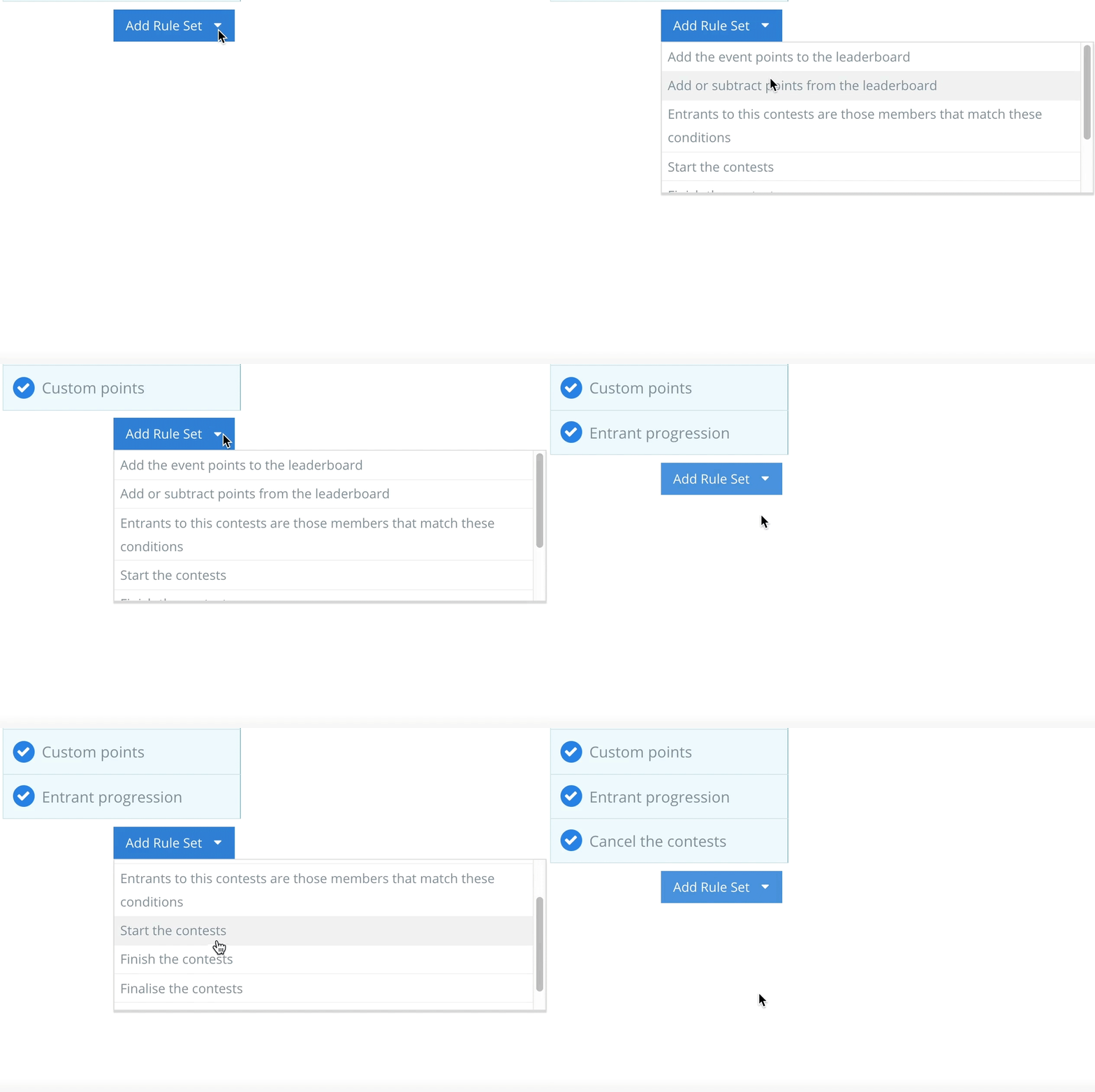
- Custom points – add or subtract points from the leaderboard
- Entrant progression – contest entrants are members that match these conditions
- Cancel the contests – indicates when to cancel the contests
RULE SET – Visuals
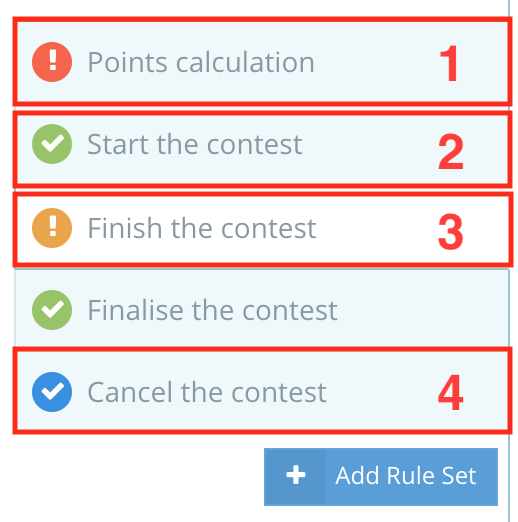
If you add a Rule or a new Ruleset, you need to fill out all the fields to be able to proceed to the next step. The icons shown in the example indicate the status of the rule configuration.
RULES CONDITIONS
Rules have a flow that makes your Competition possible. You can rank rules sections as 1, 2 and 3, e.g. if Properties is number 1, it determines sections 2 and 3 functions, e.g. Fact, Operator and Constant and Add or subtract points. If this additional feature exists only in the Points calculation Ruleset, then third-ranking appears in that Rule.
SCENARIO NUMBER 1
Properties → Fact, Operator and Constant → Add or subtract points.
SCENARIO NUMBER 2
Properties → Fact, Operator and Constant
Properties
Each Ruleset has the same properties:
- Conditional match – can be selected from ALL or ANY.
|
All or Any match conditions describe how rules interact. If the conditional match is set to ALL, then all rules must evaluate, if it is set to ANY, then only 1 rule has to evaluate. The first that matches all conditions will be triggered. This works on the principle of And / Or. By clicking And Condition, you add conditions with an AND that extend the rule.
2. Evaluation criteria – can be selected from TRUE or FALSE (works directly with Condition match)
|
EXAMPLE

Fact. Operator. Constant.
The Fact, Operator, and Constant depend on the Ruleset you have selected. Facts and operators are pre-created and can be selected from the drop-down list. Constants are either values that you need to enter, or are pre-created so you can select them from a drop-down list.

- fact
- operator
- constant
| Ruleset | Fact | Operator | Constant | Example |
| Event points | The action | is |
|
The action is bet (points are calculated when a bet is sent) |
| The product | is |
|
The product is Fruits (points are calculated when an action is sent from the product/game Fruits) | |
| The event source value |
|
value | The event source value is equal to or more than X (points are calculated when event source values of X or more are sent)
The event source value is more than X (points are calculated when event source values of more than X are sent) The event source value is equal to X (points are calculated when event source values of X are sent) The event source value is less than or equal to X (points are calculated when event source values of X or less are sent) The event source value is less than X (points are calculated when event source values of less than X are sent) |
|
| The event points value |
|
value | The event points value is equal to or more than X (points are calculated when event points values of X or more are sent)
The event points value is more than X (points are calculated when event points values of more than X are sent) The event points value is equal to X (tpoints are calculated when event points values of X are sent) The event points value is less than or equal to X (points are calculated when event points values of X or less are sent) The event points value is less than X (points are calculated when event points values of less than X are sent) |
|
| Start the contests | The competitions | is | active | The competitions is active (the contests will start when ….To be updated…) |
| The contests parents |
|
finalised | The contests parents are all finalised (the contests will start when all the previous contests have all been finalised)
The contests parents are not all finalised (the contests will start when all the previous contests are not all been finalised) |
|
| When the current date |
|
value | When the current date is XX (the contests will start when the current date is XX)
When the current date is before XX (the contests will start when the current date is before XX) When the current date is after XX (the contests will start when the current date is after XX) When the current date is on or after XX (the contests will start when the current date is on or after XX) When the current date is on or before XX (the contests will start when the current date is on or before XX) |
|
| When the current time |
|
value | When the current time is XX (the contests will start when the current time is XX)
When the current time is before XX (the contests will start when the current time is before XX) When the current time is after XX (the contests will start when the current time is after XX) When the current time is on or after XX (the contests will start when the current time is on or after XX) When the current time is on or before XX (the contests will start when the current time is on or before XX) |
|
| Finish the contests | The contests have been active for |
|
|
The contests have been active for more than XX minute (the contest will end in more than XX minute)
The contests have been active for more than or exactly XX minute (the contest will end in more than or exactly XX minute) The contests have been active for less than or exactly XX minute (the contest will end in less than or exactly XX minute) The contests have been active for less than XX minute (the contest will end in less than XX minute) The contests have been active for more than the time between contests start, and competitions end in (the contest will end in more than the time between contests start, and competitions end in) The contests have been active for more than or exactly the time between contests start, and competitions end in (the contest will end in more than or exactly the time between contests start, and competitions end in) The contests have been active for less than or exactly the time between contests start, and competitions end in (the contest will end in less than or exactly the time between contests start, and competitions end in) The contests have been active for less than the time between contests start, and competitions end in (the contest will end in less than the time between contests start, and competitions end in) |
| When the current date |
|
value | When the current date is XX (the contests will end when the current date is XX)
When the current date is before XX (the contests will end when the current date is before XX) When the current date is after XX (the contests will end when the current date is after XX) When the current date is on or after XX (the contests will end when the current date is on or after XX) When the current date is on or before XX (the contests will end when the current date is on or before XX) |
|
| When the current time |
|
value | When the current time is XX (the contests will end when the current time is XX)
When the current time is before XX (the contests will end when the current time is before XX) When the current time is after XX (the contests will end when the current time is after XX) When the current time is on or after XX (the contests will end when the current time is on or after XX) When the current time is on or before XX (the contests will end when the current time is on or before XX) |
|
| Finalise the contests | The contests finished |
|
value | The contests finished is more than XX minutes ago (the contests will finalise after more than XX minutes it finished)
The contests finished is equal or more than XX minutes ago (the contests will finalise after exactly or more than XX minutes it finished) The contests finished is equal or less than XX minutes ago (the contests will finalise after exactly or less than XX minutes it finished) The contests finished is less than XX minutes ago (the contests will finalise after less than XX minutes it finished) |
| Custom points | The count of events where the nested condition(s) evaluate to TRUE for the event |
|
value | The count of events where the nested condition(s) evaluate to TRUE for the event is equal to or more than XX (The points will calculate when more or equal than XX amount of events are sent)
The count of events where the nested condition(s) evaluate to TRUE for the event is more than XX (The points will calculate when more than XX amount of events are sent) The count of events where the nested condition(s) evaluate to TRUE for the event is XX (The points will calculate when XX amount of events are sent) The count of events where the nested condition(s) evaluate to TRUE for the event is equal to or less than XX (The points will calculate when less or equal than XX amount of events are sent) The count of events where the nested condition(s) evaluate to TRUE for the event is less than XX (The points will calculate when less than XX amount of events are sent) |
| The sum of all the source values for events where the nested condition(s) evaluate to TRUE for the event |
|
value | The sum of all the source values for events where the nested condition(s) evaluate to TRUE for the event is equal to or more than XX (The points will calculate when the sum of all the source values is equal to or more than XX)
The sum of all the source values for events where the nested condition(s) evaluate to TRUE for the event is more than XX (The points will calculate when the sum of all the source values is more than XX) The sum of all the source values for events where the nested condition(s) evaluate to TRUE for the event is equal to XX (The points will calculate when the sum of all the source values is equal to XX) The sum of all the source values for events where the nested condition(s) evaluate to TRUE for the event is equal to or less than XX (The points will calculate when the sum of all the source values is equal to or less than XX) The sum of all the source values for events where the nested condition(s) evaluate to TRUE for the event is less than XX (The points will calculate when the sum of all the source values is less than XX) |
|
| The sum of all the points for events where the nested condition(s) evaluate to TRUE for the event |
|
value | The sum of all the points for events where the nested condition(s) evaluate to TRUE for the event is equal to or more than XX (The points will calculate when the sum of all the points for events is equal to or more than XX)
The sum of all the points for events where the nested condition(s) evaluate to TRUE for the event is more than XX (The points will calculate when the sum of all the points for events is more than XX) The sum of all the points for events where the nested condition(s) evaluate to TRUE for the event is equal to XX (The points will calculate when the sum of all the points for events is equal to XX) The sum of all the points for events where the nested condition(s) evaluate to TRUE for the event is equal to or less than XX (The points will calculate when the sum of all the points for events is equal to or less than XX) The sum of all the points for events where the nested condition(s) evaluate to TRUE for the event is less than XX (The points will calculate when the sum of all the points for events is less than XX) |
|
| Entrant progression | The entrants lowest finish position (rank) during the previous round |
|
value | The entrants lowest finish position (rank) during the previous round was more than XX (The entrants will be able to participate in the progression contest when the entrants lowest finish position (rank) during the previous round was more than XX)
The entrants lowest finish position (rank) during the previous round was equal to or more than XX (The entrants will be able to participate in the progression contest when the entrants lowest finish position (rank) during the previous round was equal to or more than XX) The entrants lowest finish position (rank) during the previous round was equal to XX (The entrants will be able to participate in the progression contest when the entrants lowest finish position (rank) during the previous round was equal to XX) The entrants lowest finish position (rank) during the previous round was equal to or less than XX (The entrants will be able to participate in the progression contest when the entrants lowest finish position (rank) during the previous round was equal to or less than XX) The entrants lowest finish position (rank) during the previous round was less than XX (The entrants will be able to participate in the progression contest when the entrants lowest finish position (rank) during the previous round was less than XX) |
| The entrants score during the previous round |
|
value | The entrants score during the previous round was more than XX (The entrants will be able to participate in the progression contest when the entrants score during the previous round was more than XX)
The entrants score during the previous round was equal to or more than XX (The entrants will be able to participate in the progression contest when the entrants score during the previous round was equal to or more than XX) The entrants score during the previous round was equal to XX (The entrants will be able to participate in the progression contest when the entrants score during the previous round was equal to XX) The entrants score during the previous round was equal to or less than XX (The entrants will be able to participate in the progression contest when the entrants score during the previous round was equal to or less than XX) The entrants score during the previous round was less than XX (The entrants will be able to participate in the progression contest when the entrants score during the previous round was less than XX) |
|
| Cancel the contests | The contests finished |
|
value | The contests finished is more than XX minutes (the contests will go to a canceled state after more than XX minutes after it finishes)
The contests finished is equal to or more than XX minutes (the contests will go to a canceled state after more than or equal to XX minutes after it finishes) The contests finished is equal to or less than XX minutes (the contests will go to a canceled state after less than or equal to XX minutes after it finishes) The contests finished is less than XX minutes (the contests will go to a canceled state after less than XX minutes after it finishes) |
Add or Subtract points
This feature becomes available when a Rule Set called Custom points is added. It works directly with Conditions:
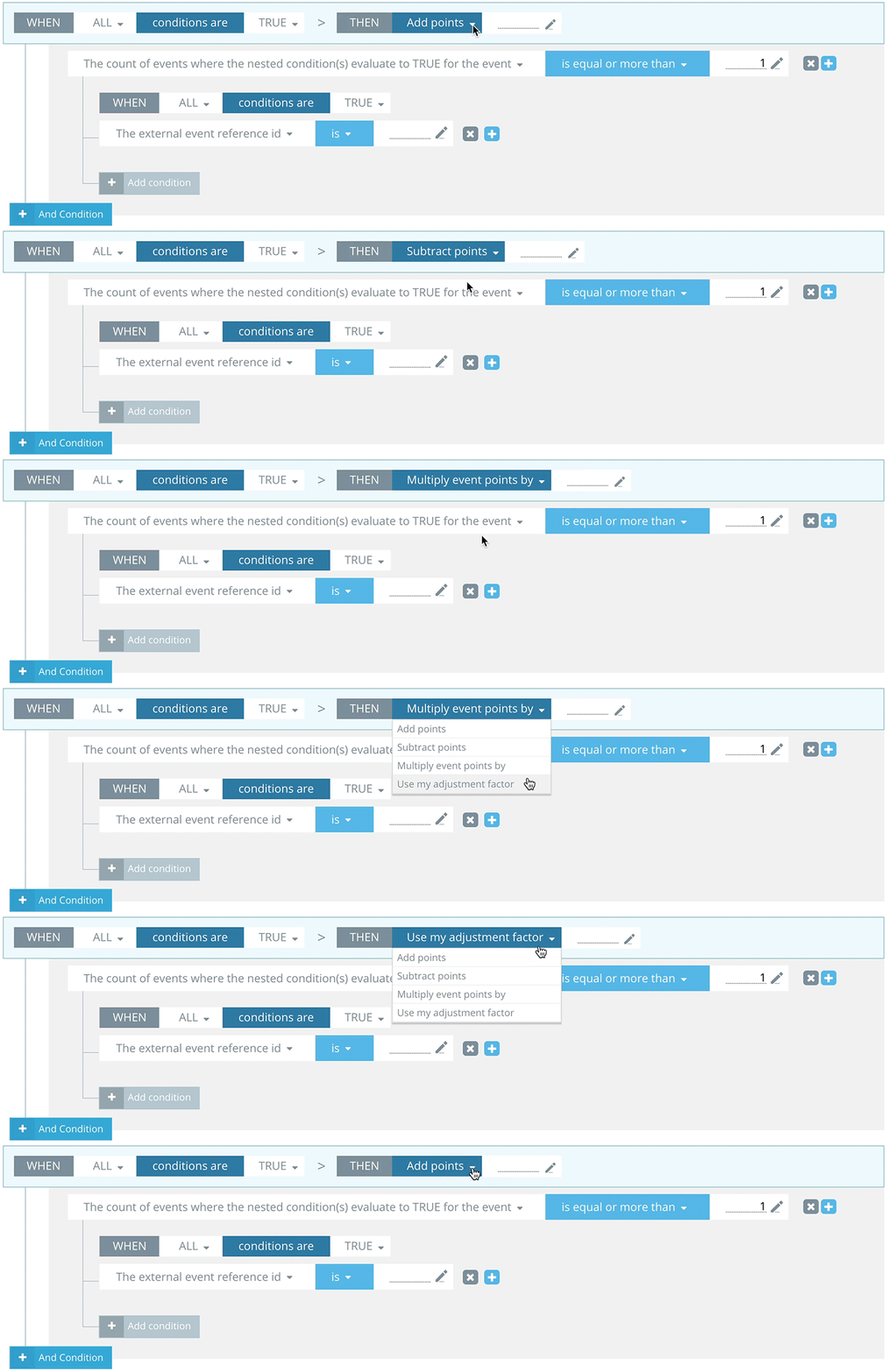
This feature lets you:
- Add points – when the rule set conditions are met, add X value points to the player.
- Subtract points – when the rule set conditions are met, subtract X value points from the player.
- Multiply event points by – when the rule set conditions are met, multiply event points for the player by X.
- Use my adjustment factor – use the pre-created adjustment factors to determine how many points will be given to a player when the rule set conditions are met.